Skip to content

Safety information

To be granted access to the experimental halls and laboratories, you must read through the safety documentation and pass the online tests relevant to you prior to your arrival at ISIS.

A man and a woman working in a lab, wearing white coats and safety specs

User Safety Information Reading L​ist

Fire

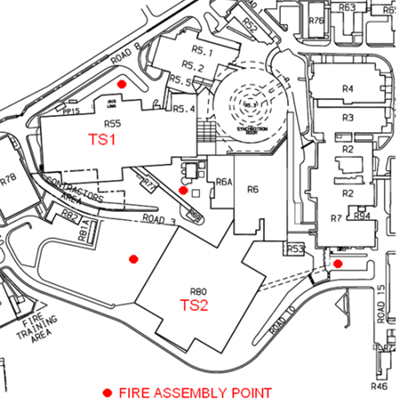
If you hear the fire alarm then leave the building by the nearest available emergency exit and make your way to the appropriate assembly point (shown on the map below).​

If you see flames or smoke then:

  1. Leave the building by the nearest available fire exit and press a break glass switch on your way out to sound the alarm.
  2. Ring 2222, or 01235 77888 to alert security and tell them where the fire is.

The map below shows the fire alarm assembly points on either side of the experimental halls.

Target Station 1 (R55)

On the North side – nearest the foyer – outside the ISIS main control room

On the South side – the assembly point in the car park next to the HRPD beamline.

Target Station 2 (R80)

On the East side – the assembly point in the car park at the end of the main entrance bridge

On the West side – West side of the building as marked on the map above

The fire alarm takes the form of a continuous bell​.

Picture of a Map

Fire Assembly Point


Illness and injuries

For serious injury or illness:

  1. Ring 2222 or 01235 77888 and ask for the ambulance.
  2. Give a brief description of the casualty and location.
  3. Get someone to meet the ambulance at the entrance to the building.
  4. Inform the duty officer in ISIS control room.​ 

For minor injuries or ailments suffered a first aider may be called for on 2222 or 01235 77888.

For minor cuts and grazes plasters and antiseptic wipes are available in first aid boxes around the lab.

Please report any injuries or incidents to your local contact immediately.

ISIS main control room (MCR)

For other emergencies, e.g. spills, the ISIS Main Control Room (MCR) should be contacted. The MCR is manned 24 hours a day, 365 days a year and there will always be one member of staff trained in first aid. The MCR will also provide assistance if any of the following occur:

a)       Equipment failure out of office hours.

b)       Sample has been lost from the experiment.

Contact the MCR by​ landline on extension 6789 or 6736, or via mobile on +44 1235 44 6789 or +44 1235 44 6736.

Once the emergency has been addressed it is important that you tell your local contact or the Duty Officer what happened, this will enable the incident to be reported through the normal channels.  This is a legal requirement.

Ionising radiation

Ionising Radiation is present in the natural environment due to naturally occurring processes.

ISIS generates ionising radiation in the form of proton and neutron beams, and adventitious gamma radiation associated with these beams. Other sources of ionising radiation you may encounter whilst working here are X-ray generators, activated samples and laboratory check sources.

All work with ionising radiation in Great Britain must be carried out in accordance with the Ionising Radiations Regulations 2017 (IRR17). This main aim of this legislation is to ensure that exposure to ionising radiation from work activities is kept as low as reasonably practicable (ALARP), and does not exceed dose limits specified in the Regulations.

The unit of radiation dose is the Sievert (Sv). 1 Sv is a very large dose, and typical workplace doses are measured in µSv or mSv. The average annual dose to the UK population from all sources of radiation (including medical exposures) is 2.7 mSv .

IRR17 specifies that anyone who is not a classified radiation worker, including members of the public, must not receive more than 1 mSv per year as a result of work with ionising radiation. Doses to users at ISIS are kept well below 1 mSv per year and are reviewed monthly by the Radiation Protection Adviser (RPA).

Working with ionising radiation

The accelerators, target stations and instruments at ISIS are heavily shielded to reduce radiation exposure to people working in the surrounding areas. Shielding on the instruments is typically constructed from steel and wax tanks.​

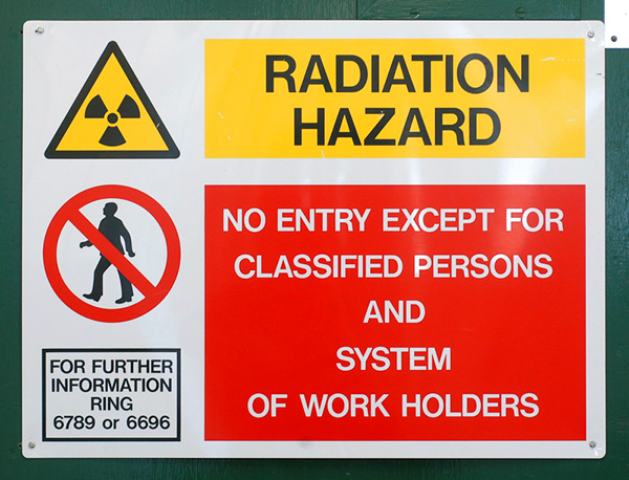
Radiation surveys are carried out in R55 and R80 before the start of every user cycle to confirm that dose rates outside the shielding will not result in personnel doses exceeding the 1 mSv per year limit. Occasionally, the surveys may show that dose rates in certain areas are higher than usual, and these areas will be indicated by signs and / or barriers.

When an instrument is taking beam, interlocks prevent access to areas where the radiation dose is very high. The interlocks are described in more detail later.

All work with Ionising Radiation is carried out under the Ionising Radiations Regulations 2017 (IRR17). For ISIS this means that we apply the following control and measurement procedures to our work:
1. Local Rules
2. Personal Dosimetry
3. Systems of Work

Local rules, personal dosimetry and systems of work

The Local Rules summarise the key working instructions intended to restrict exposure in radiation areas. They will include at least the following information:
  • A description of the area covered by the Rules and its radiological designation.
  • The radiological hazards which may be present in the area.
  • The formal dose investigation level.
  • Names and contact details of responsible people, including the Radiation Protection Supervisor (RPS). The RPS is responsible for supervising working arrangements set out in the Local Rules.
  • Detailed working arrangements for the area.
  • Contingency plans.

You must have read and understood the Local Rules before starting work on your experiment. Please contact the RPS if you have any questions about the Local Rules.

TS1 local rules (pdf)

TS2 local rules (pdf)

Personal Dosimetry & System of Work

All ISIS users are required to wear a personal dosimeter, which is issued from the Health Physics Office.  Please note that dosimeters are only valid for the month shown on the front of the badge. It is a requirement of IRR17 that you wear your dosimeter correctly and take care of it. Dosimetry must:

  • be worn at all times when in the ISIS experimental halls,
  • be worn on the outside of your clothing, between the waist and shoulder – not in a pocket or a bag,
  • be returned to the Health Physics Office at the end of your experiment.

If you lose or damage your dosimeter, please obtain a replacement from the Health Physics Office.

When you are issued with your dosimeter you will also receive a ‘System of Work for ISIS Controlled Areas’. This summarises the conditions for entry to Controlled Radiation Areas, including dosimetry arrangements, for people who are not Classified Radiation Workers. However, please remember that the detailed working instructions specific to your area will be found in the Local Rules.

If you are a Classified Radiation Worker, you are required to present your radiation passbook at the Health Physics office before starting work in ISIS radiation areas.

A monthly environmental dosimeter is installed in each instrument’s control cabin to record the total dose at that location. Results are reviewed regularly by the Radiation Protection Adviser to ensure that doses in these areas are being kept ALARP.

If you have any questions about working with radiation at ISIS, please speak to your Radiation Protection Supervisor in the first instance.

Active samples

Certain elements will become activated by the beam. As part of the ERA approval process an induced activity prediction is made based on the chemical composition declared. This prediction allows categorisation of them as either red, orange, green.

Radioactive samples require special risk assessments and transport arrangements. Uranium and Thorium samples must also be transported well in advance to ISIS for your experiment in compliance with ONR (Office of Nuclear Regulation) SAFEGUARDS regulations.

The Radiation Hazard section of the sample record sheet gives an estimate of the likely radioactivity of the sample and what length of time is required for this activity to an acceptable level for handling. The sample will be put in one of three categories – Short, medium, long.

RED HIGH INDUCED RADIOTOXICITY

Red samples are expected to have a high level of activity when they are removed from the neutron beamline.

MODERATE INDUCED RADIOTOXICITY

Orange samples are expected to have some level of activity.

GREEN LOW INDUCED RADIOTOXICITY

Green samples are expected to have no activity.

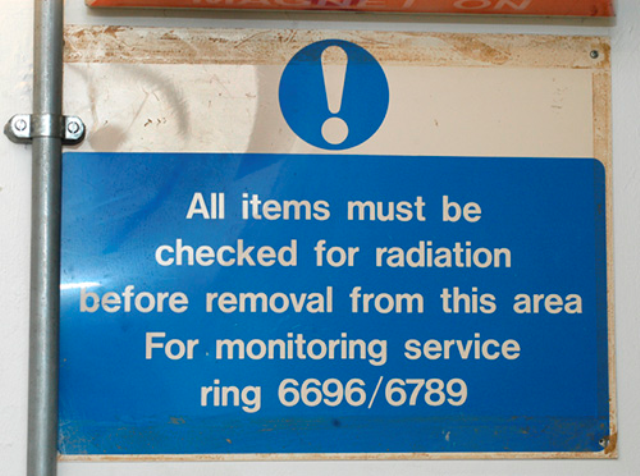
It is important to remember that the ERA document provides only an estimate of induced activity and samples should always be checked with a radiation monitor when they come out of the beam.

Follow the procedure below when you remove a sample attached to a centre stick from the instrument.

  • Do not touch the sample holder.
  • Check its activity using the beamline radiation monitor. Keep the sample at arm’s length and minimise the time you are in contact with it.
  • If the activity level on the sample is less than 75 µSv per hour (micro-Sieverts) then you may remove it from the stick yourself.
  • If it is above 75 µSv per hour then ring the Duty Officer on 6789 or Health Physics on 6696 for assistance.
  • If the sample is spilt, leave the area immediately, call the MCR, warn others and wait for Health Physics assistance.

If you are unsure how to deal with an active sample then talk to your Local Contact first. If they are unable to help then call Health Physics during working hours and the MCR otherwise.

If you are leaving an active sample at ISIS then please enter the details in the active samples logbook and label the sample with the supplied labels in the log book.

If you would like to take an active sample away with you, or if you would like to dispose of it then please contact the sample safety team (isissamplesafety@stfc.ac.uk).

Signs

You will see many signs whilst working at ISIS. These signs are used to identify the hazards present and give useful information. Four different colours are used.

Red signs are Prohibition signs.

A sign prohibiting behaviour likely to increase or cause danger, such as a No Entry sign. Red is also used to identify and locate fire-fighting equipment.


Red Hazard Warning Sign

Yellow signs are warning signs.

A sign giving warning of a hazard or danger, such as a laser radiation sign.

Yellow Warning Sign

Blue signs are mandatory signs.

 A sign giving specific action to be taken, such as the wearing of personal protective equipment.

Blue Warning Sign

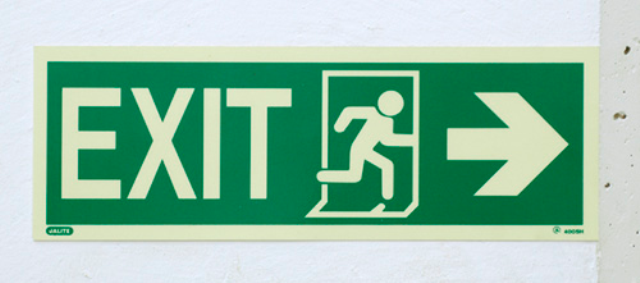
Green signs are Emergency Escape and First Aid signs.

A sign giving information on emergency exits, escape routes, first aid or rescue facilities.

Green Warning Sign

Temperature hazards at ISIS

  • Please do not fill cryostats with liquid Helium or liquid Nitrogen, the Experimental Operations Cryogenics team monitor the cryogen levels and are always available to do this for you. Self-filling can only take place if a prior agreement is made and the necessary training has been given by the IEOD Cryogenics team.
  • Always ensure that the cryostat or CCR top loading Cryostat sample volume is flushed with Helium gas and is at atmospheric pressure before removing the sample stick.
  • Take precautions to avoid cold burns – use suitable gloves – when dealing with sample sticks that have been in or are going into a Helium cryostat or CCR top loading Cryostat.
  • When inserting or removing samples warm the cryostat to 100K to ensure that there is no liquid helium in the volume around the sample space, the combination of rapid expansion of gas and change in temperature can damage the cryostat.
  • Cryomagnets will always have flashing amber beacons when energised and hazard notices displayed.
  • Avoid carrying items that can be attracted or damaged by high magnetic field when in close vicinity of the magnet.
  • Please note that some of the outer components may get very hot when using a furnace.
  • Cadmium is not allowed in any furnace or piece of Sample Environment equipment that is intended for use above 120°C.
  • Extra care should be taken when using Vanadium cans above 600°C as they may become embrittled.
  • Be aware that your sample may behave unexpectedly in the furnace and give off a gas or act corrosively.
  • Any apparent loss of sample containment must be reported to the Duty Officer/Health Physics and Experimental Operations support staff who will help you sort out the situation.​

For more information and help please contact IEOD Cryogenics team – ieod.cryogenics@stfc.ac.uk

Pressure hazards

Hazards exist within pressure systems due to – The stored energy of the compressed gas and the chemical nature of that gas. ​

Various codes of practice apply to all pressure and vacuum systems. In summary:

  • All pressurising systems must have a pressure relief device such as a bursting disc or pressure relief valve.
  • No pressure or gas-handling cell may be used at ISIS unless it has been assessed by the Lab’s nominated engineer for pressure systems. The engineer can be contacted through the Pressure and Furnace Section Leader – Chris Goodway.
  • Hazardous gas systems should have a “Hazardous Gas” sign displayed, and a written shut down procedure, these will be supplied with the system by the Pressure and Furnace Section.The pressure system should only be used after authorisation is given by a member of the Pressure and Furnace Section.
  • Depending on the gas being used it may also be necessary to have an extraction system in place. (There are fixed extraction systems available on many of the beamlines but if one is not available a portable system can be used).

Please Note: The ISIS Experimental Operations Pressure and Furnace Section and safety advisor will tell you which particular precautions are required for your experiment.

Electrical hazards

User Provided Electrical Equipment Guidelines

Users bringing the following equipment for use at ISIS must indicate this on the User Equipment section of the Experimental Risk Assessment (ERA) and follow the guidelines given below.

  • Portable Electrical Equipment.
  • Non-CE marked Electrical Equipment.
  • High Voltage Equipment (Voltages >600Vac, >900Vdc).
  • RF Equipment.
  • Equipment or systems that include personal safety interlocks.

Do not operate portable electrical equipment without an in date Portable Appliance Test (PAT) sticker. ISIS can provide a PAT testing service if you are unable to test your equipment at your institute. If you require PAT testing please indicate this on your ERA and contact Jamie Nutter or the electronics lab on Ext: 6318 before using the equipment. Mobile device chargers and battery powered devices are exempt from testing but must be in good physical condition and working order.

Non-CE marked electrical equipment must undergo an in-depth electrical inspection and test prior to equipment use. If you plan to use non-CE marked equipment please indicate this on your ERA and contact Jamie Nutter or the electronics lab on Ext: 6318 at least 48 hours before the start of your experiment to allow enough time for the inspection and tests to be completed.

The operation of electrical equipment that has failed a PAT test or an electrical inspection and test is prohibited at ISIS.

High voltage equipment that can source more than 5mA will require a risk assessment and method statement prior to its operation at ISIS. Personnel safety interlocks maybe required to reduce risk. Please contact Jamie Nutter  at least two weeks in advance of your experiment to discuss the use of this equipment.

RF equipment will require a risk assessment and method statement prior to its operation at ISIS. Personnel safety interlocks may be required to reduce risk. Please contact Jamie Nutter  at least two weeks in advance of your experiment to discuss the use of this equipment.

Electrical equipment or systems that include personnel safety interlocks will require a functional test of the interlock system prior to its operation. Please provide this equipment at least 48 hours before the start of your experiment to allow enough time for the functional tests to be completed. Please contact Jamie Nutter or the electronics lab on Ext: 6318.

Failure to adhere to these procedures may result in the operation of your equipment being prohibited.

Electrical Equipment Hazards

Electrical equipment and systems are wide ranging and pervasive throughout the ISIS facility; from mobile device chargers to high voltage power supplies. The hazards associated with the use of electrical equipment include, electric burns, electrocution, fire and arcing. On average there are over 11,000 electrical incidents harming individuals throughout the UK every year. To reduce the risk of harm for operators of electrical equipment at ISIS the following general rules must be followed.

Do not operate the following equipment without notifying ISIS via the User Equipment section of the Experimental Risk Assessment and following the User Provided Electrical Equipment Guidelines.

  • Electrical Equipment requiring a PAT test.
  • Non-CE marked Electrical Equipment.
  • High Voltage Equipment (Voltages >600Vac, >900Vdc).
  • RF Equipment.
  • Equipment or systems that include personnel safety interlocks.

Do not attempt to connect non-UK plug types into UK sockets. ISIS instrument cabins have a range of non-UK mains sockets. The Electrical & Electronic User Support Group can also provide a wide range of plug adaptors. Please contact Jamie Nutter or the lab on Ext: 6318.

Where possible use an RCD protected electrical supply or extension lead. RCD protected supplies can be identified by test and reset buttons. RCD protected extension leads are readily available from the Electrical & Electronic User Support Group. Please contact Jamie Nutter or the lab on Ext: 6318. Always test the RCD prior to use and report test failures to your local contact.

Do not supply electricity to equipment by series-linking multiple extension leads together.

Do not misuse electrical equipment, electrical systems and parts thereof.

Do not operate electrical equipment, electrical systems and parts thereof in an environment which increases a risk of harm without a prior risk assessment approved by your Local Contact.

Do not interfere with or remove enclosures or covers on electrical equipment, electrical systems and parts thereof.

Do not attempt to make any repair to electrical equipment, electrical systems and parts thereof.

Do not misuse or interfere with interlock systems.

Observe and comply with all signs and barriers.

Do not operate or interfere with any parts associated with the distribution of the mains supply (electrical switchgear, switchboards or distribution boards)

Whilst working at ISIS report any concerns related to the condition or operation of electrical equipment to your Local Contact.


Chemical hazards

Use of chemicals at ISIS is governed by the COSHH (Control Of Substances Hazardous to Health) regulations 2002.

COSHH will be familiar to many of you in your everyday work but in summary:

  • Any chemical in use at ISIS should be labelled and the SDS (Safety Data Sheet) for that chemical should be available.
  • Any work involving chemicals at ISIS needs to be declared as part of the ERA or for non beamline experiments they should have a separate risk assessment and method statements.
  • The ERA  for each sample covers running that sample on the beamline, handling or preparation or chemistry of that sample before and after irradiation and its return or disposal.
  • No sample may be run on an ISIS beamline without an ERA.
  • The information given in the ERA is intended to help you in your work and is the Labs assessment of the hazardous nature of the sample that you are using. You are required to follow and abide by its instructions.

Transport and Storage of Chemicals​

If your samples have been classified as Dangerous Goods for transport on the approved ERA (they have been assigned a UN Number, Hazard Class and Packing Group) you must speak to your local contact to arrange for the samples to be transported safely and legally. ISIS Sample safety team are trained to advise on this.

If you have finished your experiment and wish to take your sample away please contact Health Physics who will come and monitor the sample and – if it is not active – sign off on the ERA and follow the dispatch/disposal instructions on the ERA.

Disposal of Samples and Associated Chemicals

The ERA includes an “After the experiment” section which details disposal/dispatch actions.

  • If a sample is appropriately labelled then the Lab will be happy to dispose of it.
  • This also applies to any waste generated by sample preparation processes.
  • If you would like the preparation laboratory staff to dispose of anything then please leave it – labelled and sealed in an appropriate container – in one of the Preparation laboratory fume hoods.

It is extremely expensive and difficult to dispose of unknown chemicals so please label all chemicals. Unattended and unlabelled samples in the laboratories will be destroyed.

If your samples have been classified as Dangerous Goods for transport (they have been assigned a UN Number, Hazard Class and Packing Group) you must speak to your local contact to arrange for the samples to be shipped back to you safely and legally via STFC Logistics.

Laser hazards

If you would like to use a class 3B laser or above in your experiment then speak to your local contact before writing the proposal so that he/she can discuss with the relevant ISIS staff how to deal with your laser.

All class 3B and class 4 lasers in use at ISIS are set up with interlocks and shielding so that bystanders cannot be exposed to dangerous levels of laser light.

A prior risk assessment is required for any work involving high powered lasers.

Laser Safety

Use of a crane

One tonne Pelloby Cranes have been placed around the hall for moving sample environment equipment.
  • If you do not have a Crane licence issued by ISIS then do not attempt to use the cranes.
  • Ask your local contact or a member of the Experimental Operations Division to help you.
  • If you are a frequent visitor you can be trained to use ISIS cranes.

Make yourself aware of the lifting operations going on in the Experimental Halls and make sure you do not stand or walk under loads which are being lifted or lowered. When the main cranes start operating a buzzer sounds.

​Listen to what the Crane ​alarm sounds like​

Shutters and interlocks TS1 (R55)

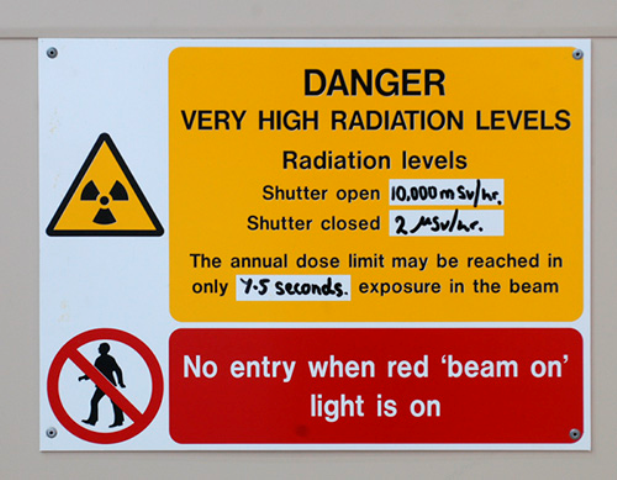
The shutter is a large wedge of steel between the target and the instrument which stops the neutrons. When the wedge is in the beam (corresponding to ‘shutter closed’ position), neutrons are blocked from entering the beam. When the wedge is not in the beam (corresponding to ‘shutter opened’ position), neutrons go through the beamline to the sample. It allows safe access to the blockhouse and other areas of the beam during the cycle. Each instrument has its own shutter and this can be raised or lowered from controls found beside the instrument and inside the cabin. To prohibit access to areas of high radiation, a series of interlocks have to be completed before it is possible to open the shutter.

The interlock system is required such that:

  1. Nobody is left inside high radiation areas.
  2. All the sections of removable shielding have been replaced.
  3. All the doors to the instrument are closed and locked.

The interlock systems on each instrument are configured according to the instrument layout; your local contact will help you understand the layout on the instrument you are using.

Instruments which have their sample positions inside a blockhouse will also have a search button or for more complicated beamlines multiple search buttons. These button must be pressed as the block house is searched by the last person to leaving the blockhouse to indicate to the system the search has been completed. For some beamlines there is an audible alarm during the search.

Instrument Search Button

A noise will be made indicating the search is complete, and then you may then close and lock the door.

All interlock systems have the following features.

First, there are locks on various parts of the instrument. The photograph below shows the door lock on CRISP.

CRISP Door Lock

Second, there are one or more green boxes containing racks of keys. These are interlock keys which ensure the beamline is in a safe state for the shutter to be opened. When all the door keys are placed in these racks the master key will be released.

Key Rack

Third, there is a green master box – with a key labelled with an M. This is the box that controls the shutter – with the key in place the shutter is released and can be opened.

Green Master Box

As the shutter opens a blue light comes on inside the high radiation area. This is linked to the shutter controls and to a radiation monitor. If you are working in a controlled area and the blue light comes on press the red beam off button or just leave the area as quickly as possible. Telephone the MCR and your local contact straight away.

Beam off buttons are found all over the hall; your Local Contact will point out the locations around your instrument.  They are linked to the accelerator and can be used to trip the beam off in cases of emergency, such as if there is an individual within a blue light area.

In summary, make sure that you know:

  1. Where the interlocks are and how they are operated.
  2. Where the search button(s) are, if they exist.
  3. How to complete a search and lock the blockhouse, if required
  4. The purpose of a blue light and what to do if you are in an area where a blue light is on
  5. Where the nearest red beam off buttons are.​

Shutters and interlocks TS2 (R80)

​Areas in and around instruments that are subject to high levels of radiation when beam is admitted are protected by an interlock system similar to the one in the TS1 experimental hall. The potential for the beamline shutter to be open and neutrons to be present is indicated by blue lighting inside an interlocked area and “Beam On” lights near the door. The shutters on TS2

In order to admit beam to a reflectometer, SANS2D or Zoom, you must:

  1. Begin a search of the beamline area. Each instrument has a pre-defined search route. The starting point of the search route is indicated by a green flashing search button.
  2. In the reflectometers, you should also see an illuminated “Area Searched” light. If this light is not on, please seek advice from your Local Contact.
  3. Press the search button only when you are sure that there is no-one in the area. A siren will start to sound. The next search point will then be indicated by another green flashing search button. Walk to this button searching the area as you go and press it when you are sure that there is no-one in the area.
  4. Continue until all search buttons have been pressed. Your Local Contact will be able tell you what the search route is for the instrument you are working on.
  5. Close the blockhouse door, ensuring that the fingers on the door are level with and fully engage with the lock.
  6. Turn and remove the key from the lock. The electronic signs around the instrument should indicate “Searched and Locked”.
  7. Put the key into the key box and turn it.

With all the key positions in the key box filled, press the “Open” button on the shutter control box.

To re-enter the instrument:

  1.  Press the “Close” button on the shutter control box and wait for the “Beam On” lights to turn off.
  2. Turn and remove the top key from the key box
  3. Insert the key into the door lock and turn it. The door will be released. Note that the search will now have to be performed again before beam can be readmitted.

In order to admit beam to WISH, LET or Nimrod:

There is no search procedure for the sample position. Check that no-one is in the sample area, close the sample gate, and follow the instructions from point 6 above.

If you find yourself inside an interlocked area with the beam (blue lights) on:

  1. Make your way quickly to the entrance door.
  2. If the door is locked, press the emergency exit button. This releases the door lock and turns beam off.
  3. Push the door to exit.
  4. Contact the MCR on ext 6789.

As on instruments in the Target Station 1 experimental hall, beam can be disabled instantaneously by pressing a beam-off button. Contact the MCR on 6789 immediately if you press a beam-off button. Please note that using a beam-off button in Target Station 2 AT ANY TIME turns beam off to ALL instruments in both experimental halls, so please use them only in an emergency.

Notes for pregnant users

​Letting us know that you are pregnant or breast-feeding

If you are coming to ISIS to do and experiment and you are pregnant or breast-feeding please contact the ISIS Dosimetry Office (ISISDOSIMETRYOFFICE@stfc.ac.uk) and let us know. Although the radiation levels in our experiment halls are very low it is important that we know so that we can plan for your visit and carry out a risk assessment with your local contact that will cover all aspects of your time here at ISIS.​